Grocery list app

The grocery list app that thinks like a shopper

Paper lists get lost and notes apps don't sort by aisle. Pauly turns a spoken sentence into a clean, organized list that's ready before you reach the store.

Free to start Works offline No account needed

A smarter grocery list app for how you actually shop

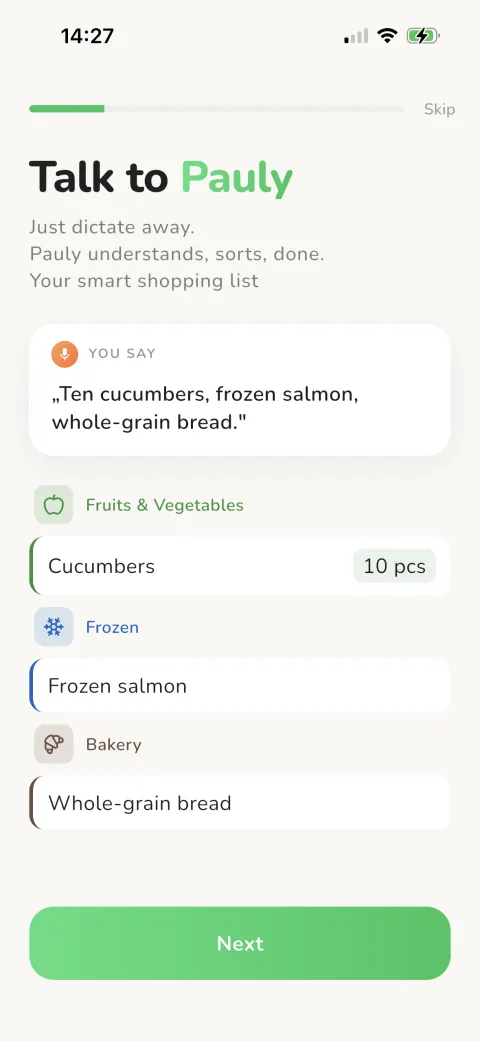
Pauly is a grocery list app — or shopping list app, whichever you call it — built around one simple idea: making a list should take seconds, not minutes of thumb-typing. Say "two liters of milk, ten eggs, and Greek yogurt" and Pauly recognizes each item, fills in the quantity and unit, and drops it into the right store section automatically. It's free to download on iPhone and Android, and you don't need an account to start.

Most people switch after the same frustration: a paper list left on the kitchen counter, or a notes app that's just a flat pile of words you scroll through twice per aisle. Pauly fixes both problems. Your list lives on your phone, works offline, and arranges itself in walking order so you stop zig-zagging the supermarket.

This page is the overview. Below you'll find what makes a great grocery list maker, how Pauly compares to paper and notes apps, who it's for, and exactly what you get free versus with Pauly Pro. For aisle sorting, voice input, or shared lists in depth, follow the links to the focused pages.

Download Now Turn your next shopping trip into a one-sentence task.

What you get in the Pauly grocery list app

Speak a whole list at once

Dictate your whole list in one natural sentence. Pauly detects where each item starts and stops — no need to say "and" or comma — turns number words like "ten" into 10, and uses its built-in grocery recognition to assign the right unit to each item.

Automatic categories

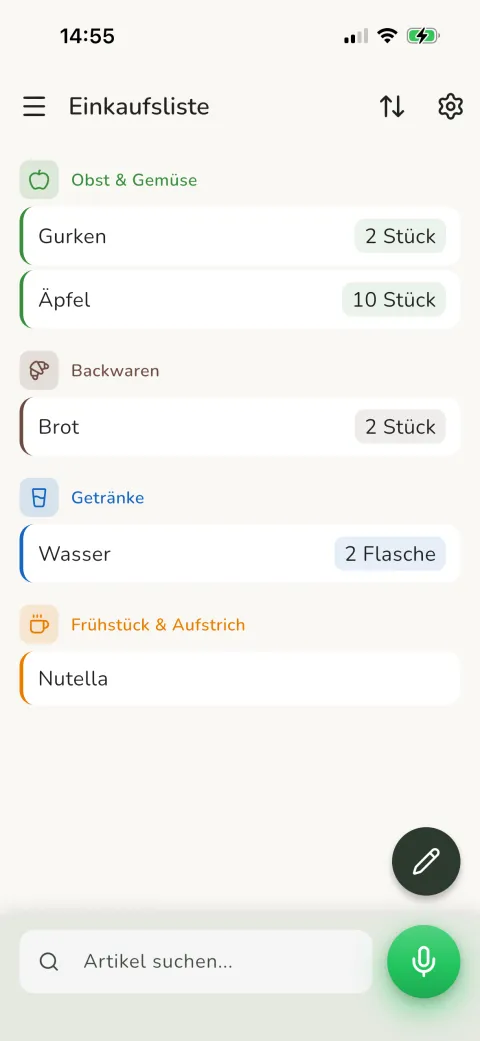
Every item lands in one of 19 store sections on its own. Milk goes to Dairy, apples to Produce, no manual tagging or sorting required from you.

Custom store route

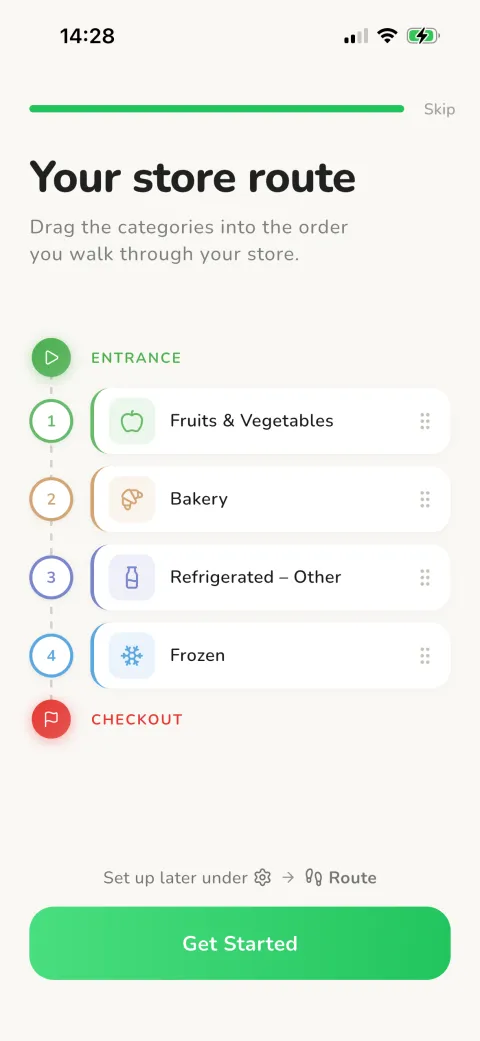
Arrange categories in your supermarket's walking order once. Pauly reuses that route every trip and shows "Station 1 of 15" as you shop.

Works fully offline

Lists are stored on your phone and load instantly, even with no signal in the back of the store, so your list is always there.

Share in real time (Pro)

With Pauly Pro, share a list by code or link. New items appear for everyone within seconds, so the list stays current as people add to it.

Tidy check-off

Tap to check items off as you shop, then clear everything you've grabbed in one tap. Single or double-tap mode prevents accidental checks.

Download Now Free to start, works offline, no account needed.

How to get started with Pauly

  1. 1

    Download free

    Get Pauly from the App Store or Google Play. It's free, ad-supported, and includes voice, categories and the smart store route from the start.

  2. 2

    Open and go

    No sign-up, no setup wizard. The app opens ready to use, with your list stored locally on your phone. Add your first item right away.

  3. 3

    Say your list

    Tap the mic and speak. Pauly recognizes each item, assigns a category and unit, and sorts everything into store order for you.

Download Now Get Pauly on iPhone and Android — it's free.

What makes a great grocery list app?

We built Pauly around the things that actually slow shoppers down. A grocery list app should be faster than a pen, smarter than a flat note, and reliable enough to trust on a busy Saturday. Here are the criteria that matter, and how Pauly handles each one.

This is also the lens to use when you compare options from a roundup. Most apps do one of these well; the difference is whether speed, organization and reliability come together in a single tool you'll actually keep using week after week.

Fast list-building, especially hands-free

The biggest time sink is the typing. Pauly lets you dictate your whole grocery list in one breath and converts speech into item, quantity and unit on the spot. Number words become numbers ("ten" to 10, "half" to 0.5), compound terms like "frozen salmon" and "whole-grain bread" are understood, and — unlike apps that make you say "and" or pause for a comma between every item — Pauly's trained data model detects where each item begins and ends, so "milk butter eggs bread" splits into separate lines on its own (connectors still work, but they're optional). Backed by 500+ products with thousands of names and synonyms, you rarely have to correct anything. Voice is just one supporting feature here; the voice page covers it in full.

Automatic organization by store section

A good list sorts itself. Pauly assigns every item to one of 19 store categories automatically, then lets you arrange those categories into your store's real walking order. Say "two liters of milk, ten eggs, and Greek yogurt" and all three land under Dairy without a tap. Four sort modes (by category, A-Z, Z-A, or your custom route) cover how different people like to shop. The aisle-sorting page goes deeper on the store route.

Sharing when you need it, solo when you don't

Shopping alone? The free version gives you the full voice and sorting experience with no strings. Shopping with someone? Pauly Pro adds real-time shared lists you can hand off by code or link, with live updates as people add or change items. Joining a shared list is possible on the free plan. The shared-list page covers collaboration in detail.

Works offline, no account needed to start

This is the trust question new users ask most: what happens if I lose signal in the store? With Pauly, nothing breaks. Lists are offline-first, so your list is stored locally and available instantly without a network on both iPhone and Android. Voice dictation runs on-device on iPhone; on Android it uses the system's speech recognition, which needs a connection. You can start the whole app with no account. Upgrade to Pauly Pro to sign in and sync across devices, and your local list carries over.

Download Now Turn your next shopping trip into a one-sentence task.

Pauly vs. a paper list vs. a notes app

If you're weighing whether to switch, here's the honest comparison. A paper list is cheap and always offline, but it gets lost, can't be shared instantly, and never sorts itself. A notes app keeps everything in one place but stays a flat, unsorted block of text with no grocery-specific parsing — even if you dictate into it with your keyboard, it never understands items, quantities or aisles. Pauly keeps the things paper and notes do well, then adds the parts they can't. The result is a digital grocery list that's always with you, organizes itself by aisle, and follows your store's walking order.

  • Voice input: paper has none, notes apps offer limited assistant dictation, Pauly handles a full spoken sentence with any item.
  • Auto-sorts by aisle: only Pauly, across 19 store categories in your own walking order.
  • Real-time sharing: paper can't, notes apps are limited, Pauly does it live with Pro.
  • Works offline: all three do, but only Pauly also sorts your list offline on both platforms.
  • Duplicate detection: paper and notes don't, Pauly spots an item that's already on the list so you can keep or discard it.
  • Free to use: all three, and Pauly's free tier is ad-supported with no account to start.
Download Now Free to start, works offline, no account needed.

Who is Pauly for?

Pauly suits anyone who shops for groceries regularly, but a few situations show off why it's different from a plain notes app or a paper sheet.

People who cook at home

Hands in the dough and out of flour? Just say "add more flour" and keep working. Hands-free entry means your weekly shopping list grows while you cook, without wiping your hands to type.

Families and couples who shop together

Your partner adds items through the week and you see the live list at the store, so nothing gets forgotten and nothing gets bought twice. Real-time sharing needs Pauly Pro; joining a shared list works on the free plan.

Anyone tired of supermarket backtracking

Set your store's layout once and Pauly orders every item in walking sequence. No more doubling back to the bakery because it was buried at the bottom of an unsorted note. You hit each section once and head for the checkout.

People switching from paper or a notes app

Moving over is painless. Download free, skip the account, and start dictating. Items sort themselves into store sections as you add them, and one-tap editing lets you fix any quantity, unit or category in a second, so by your second trip it already feels like yours.

Download Now Get Pauly on iPhone and Android — it's free.

Free vs. Pauly Pro: what do you actually get?

Pauly is genuinely useful for free, and the free tier isn't a crippled demo. Voice input, automatic categories and the smart store route, the features that make Pauly worth using, are all included at no cost. Pro removes ads and unlocks collaboration and sync for households and power users.

That split is deliberate. Many grocery list apps lock basic sorting or categories behind a paywall; Pauly keeps the core list-making experience free and reserves the paid tier for the multi-device and multi-person features that genuinely cost more to run.

Free, ad-supported

Voice input backed by Pauly's grocery recognition — covering 500+ products with thousands of names and synonyms — automatic category assignment, the smart store route across 19 categories in your custom order, one local list, and no account required. It's one of the more capable free grocery list app options for solo shopping.

Pauly Pro, €0.99/month

Pro removes ads, unlocks unlimited lists, lets you create and host real-time shared lists, and adds cross-device cloud sync plus premium support. Pricing is straightforward: €0.99 monthly, €7.99 yearly (about 33% less than monthly), or €12.99 once for lifetime access, a rare one-time option when most grocery list apps are subscription-only.

Download Now Turn your next shopping trip into a one-sentence task.

Why shoppers choose Pauly

  • Dictate the whole weekly list in seconds instead of thumb-typing every item.
  • Items sort into 19 store sections in your walking order.
  • Works offline, your lists run without a signal on both platforms.
  • Start with no account; upgrade to Pro to sign in and sync.
  • Free on iPhone and iPad, Android phones and tablets.
  • Share lists in real time with Pauly Pro.
Download Now Free to start, works offline, no account needed.

Frequently asked questions

What is the best free grocery list app?

The best free option depends on how you shop, but the strongest free apps combine fast entry with automatic sorting. Pauly's free, ad-supported tier includes voice input, automatic categories and a custom store route, with no account required, making it one of the more capable free grocery list app choices for solo shoppers.

Is there a grocery list app that works offline?

Yes. Pauly's lists are offline-first: they're stored locally on your phone and load instantly with no network connection on both iPhone and Android. Voice dictation runs on-device on iPhone; on Android it uses the system's speech recognition, which needs a connection. Cloud sync and shared lists need a connection, but everyday list-making works completely offline.

What is the best grocery list app for families?

For families, the key feature is shared lists that update live. With Pauly Pro you can share a list by code or link, and changes appear for everyone within seconds. The dedicated shared grocery list page covers collaboration, attribution and notifications in full.

Can I share a grocery list with my partner?

Yes. Real-time shared lists are part of Pauly Pro: share by code or link and both of you see changes within seconds, while joining a shared list works on the free plan. See the dedicated shared grocery list page for the full walkthrough.

What's the difference between a grocery list app and a notes app?

A notes app stores a flat block of text with only limited voice through Siri or Google, and it never sorts itself. A grocery list app like Pauly understands grocery items, assigns quantities and units, groups everything by store section, and arranges your list in aisle order so shopping is faster.

Does Pauly work on both iPhone and Android?

Yes. Pauly runs on iOS 13 and up (iPhone and iPad) and Android 7 and up (phones and tablets). The full app and voice recognition work in both German and English, and you can switch language without restarting, which suits households that mix devices.

Do I need an account to use a grocery list app?

Not to start with Pauly. You can begin instantly with no account, and your list is stored locally on your device. Signing in (with Google, Apple or email) to sync across devices is part of Pauly Pro; when you upgrade and sign in, your local list carries over. Joining someone else's shared list is free.

Can I add items to my grocery list by voice?

Yes. Tap the mic and speak a whole list in one sentence; Pauly converts speech into item, quantity and unit, drawing on a built-in catalog of 500+ products with thousands of names and synonyms. On iPhone the dictation runs on-device; on Android it uses the system's speech recognition. The dedicated voice shopping list page covers the full breakdown of how dictation works.

What grocery list app sorts items by aisle?

Pauly does. It assigns each item to one of 19 store categories automatically, then lets you drag those categories into your store's walking order. That custom route is reused every trip, and a station indicator shows your progress, so you hit each aisle once with no backtracking.

Is there a grocery list app that's completely free with no subscription?

Pauly's free tier is ad-supported and needs no subscription, covering voice input, automatic categories and the smart store route. If you prefer no ads plus sharing and cross-device sync, Pauly Pro offers a one-time lifetime purchase at €12.99, so you can avoid a recurring subscription entirely.

Download Now Get Pauly on iPhone and Android — it's free.

Download Pauly free and never lose a grocery list again

Get Pauly free on the App Store or Google Play, no account needed to start, available for iPhone and Android.